9 Best Heat Mat Thermostat Controllers for Seedlings (November 2026)
The best heat mat thermostat controllers include the BN-LINK Reptile Thermostat Temperature Controller for simple seed starting control, the VIVOSUN Digital Heat Mat Thermostat Controller for tidy shelf setups, and the Hydrofarm JumpStart Digital Thermostat Controller for Heat for germination only temperatures.
On this page (8 sections)
- Which heat mat thermostat controller should you buy first?
- Best heat mat thermostat controller: how we compared these picks
- How do I set up a thermostat for a seedling heat mat?
- What temperature range do I need for seed germination?
- How much wattage can a heat mat thermostat handle?
- Single zone or dual zone: which do I need?
- Do I want app control or a simple plug-in display?
- Verdict: which heat mat thermostat controller is the best buy?
The best heat mat thermostat controller for most seed starters is the BN-LINK, because it covers 40-108°F, handles 1000W and sets up with three buttons. Other picks offer similar ranges but trade range, wattage or zones differently.
A thermostat does not heat anything by itself. It switches your mat on and off from the probe, so placement matters as much as the setpoint.
Place the probe under the tray or at root level in the mix, and keep it from touching the mat directly. Our score weighs range, wattage, probe reach and controls you will actually use.
A controller that can also run a fan suits a tent or sunny room where heat builds up after germination. Wattage and probe length decide fit more than brand names, so match the rating to your mat first.
Our picks at a glance
-
1
 Best for simple seed starting control
BN-LINK Reptile Thermostat Temperature Controller
9.7/10 our score
See it on Amazon -
2
 Best for tidy shelf setups
VIVOSUN Digital Heat Mat Thermostat Controller
9.6/10 our score
See it on Amazon -
3
 Best for germination only temperatures
Hydrofarm JumpStart Digital Thermostat Controller for Heat
9.5/10 our score
See it on Amazon
- 4
 Check it
Inkbird ITC-308 Digital Temperature Controller Thermostat
Best for heating and cooling - 5
 Check it
Pymeter Digital Temperature Controller Dual Probe Reptile
Best for two zones - 6
 Check it
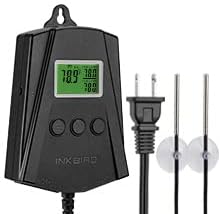
Inkbird WiFi Heat Mat Reptile Thermostat Controller
Best for remote monitoring - 7
 Check it
DIGITEN 110V 15A Temperature Controller DTC151 Plug
Best for a higher current plug - 8
 Check it
BRONZEOX Digital Seedling Thermostat Temperature Controller
Best for multi-tray germination - 9
 Check it
DIGITEN Temperature Controller Heat Mat Thermostat Outlet
Best for a large readable display
Which heat mat thermostat controller should you buy first?
For a single tray and a standard mat, the BN-LINK and VIVOSUN are the simplest fits. For two trays at different temperatures, the Pymeter or Inkbird WiFi model earns its extra complexity.
If you are still choosing the mat itself, start with our Best Seedling Heat Mat guide or the best seedling heat mat with thermostat roundup. Pair any mat with good light from our Best Grow Lights For Seedlings picks, because heat without light leads to leggy growth.
Start with your mat and tray count
Count your trays and note the wattage printed on your mat before you compare controllers. One tray with one mat points to a single zone heat-only model.
Two trays with different crops point to a dual outlet model with two probes.
Room conditions also shape the choice. A cool basement favours heating only, while a bright shelf or grow tent may need a fan relay.
The wrong type of control cannot fix a mismatch between the device and the room.
{% if false %}
BN-LINK Reptile Thermostat Temperature Controller: Best for simple seed starting control
- 40-108°F control range
- 1000W, 8.3A max load
- 3-button Fahrenheit and Celsius setup
- 3.94 ft power cord and 4.92 ft probe
- ETL listed
A straightforward plug-in thermostat for a seedling heat mat, with a wide range for germination and a bright display for quick checks.
Pros
- Wide 40-108°F range
- 1000W capacity
- Bright LED display and hanging tab
Cons
- Heating use only
- Heat mat not included
The BN-LINK suits a first-time seed starter who wants a thermostat for an existing mat, with no app needed. Its 40-108°F range covers cool germination and warm rooting needs with one plug.
The three-button setup switches between Fahrenheit and Celsius and sets your target in seconds. The bright LED display and indicator lights let you check status at a glance in a dark room.
The 3.94 ft power cord and 4.92 ft probe let you route the probe under a tray while keeping the controller off the mat. The hanging tab keeps cords tidy and away from damp mix.
BN-LINK rates it at 120VAC, 8.3A and 1000W, which suits most single seedling mats and leaves headroom for a larger mat. It is heating only and cannot run a cooling fan, and the mat is not included.
Choose it for simplicity and range. Skip it if you need dual zones, app alerts or cooling for a tent that overheats.
VIVOSUN Digital Heat Mat Thermostat Controller: Best for tidy shelf setups
- 40-108°F control range
- 1000W
- 3-button setup
- Sensor probe included
- Hanging tab and wall mount
A close match to the top pick, with the same core range and a hexagonal body that suits a crowded germination shelf.
Pros
- 40-108°F control range
- Angled socket helps cords
- Hanging tab and wall mount
Cons
- Heating control focus
- Heat mat not included
The VIVOSUN suits growers who like the BN-LINK specs but want a different body shape for a shelf. It also controls from 40-108°F at 1000W, with a display range of 32-210°F.
Its hexagonal shape and extra-fortified plastic body resist rust and rough handling. The angled socket keeps cords neat when the controller sits close to a wall or tray rack.
Setup uses three buttons to set temperature or switch Fahrenheit and Celsius without reading the manual. A hanging tab and wall mount lift the unit off a damp shelf for easier reading.
The sensor probe tracks root temperature, so you place it under a tray rather than guessing from room air. It works with any heat mat and plugs into a North American outlet.
Choose it for a tidy, simple setup. Skip it if you need app control, two zones or cooling for a warm tent.
Hydrofarm JumpStart Digital Thermostat Controller for Heat: Best for germination only temperatures
- 68-108°F control range
- 6 ft probe cord
- Digital readout in Fahrenheit or Celsius
- LED heating indicator
- ETL certified
Focused on warm germination and rooting temperatures, with a long probe cord for trays with a dome.
Pros
- Range starts at 68°F for germination
- 6 ft probe cord
- ETL certified
Cons
- Narrower low end than 40°F models
- Heat mat not included
The Hydrofarm JumpStart suits growers who only need germination and rooting temperatures. For cuttings, compare natural rooting hormones.
Its range runs from 68-108°F, so it skips the colder settings that seed starters rarely use and focuses the dial on the warm zone where seeds actually sprout.
The 6 ft probe cord helps in a tray and dome setup, where the probe needs to reach under the tray while the controller stays outside the humidity. A digital readout in Fahrenheit or Celsius and an LED heating indicator keep status clear without a complicated menu to learn.
Hydrofarm calls it ETL certified, and it uses a three-prong grounded plug. That safety detail matters for a device that may run for many hours during germination, especially on a shelf near water trays.
The trade-off is range. If you want to hold a lower temperature for other projects, the 40°F models give you more headroom for brewing or early storage.
For seed starting alone, 68°F as the low end is often enough for peppers, tomatoes and similar crops. For rose propagation, see rooting hormones for rose cuttings.
Choose it for a focused germination thermostat. Skip it if you need cooling, dual zones or a lower minimum temperature for non-seed uses.
Inkbird ITC-308 Digital Temperature Controller Thermostat: Best for heating and cooling
- Dual relay for heating and cooling
- 1100W max at 110V
- Dual display window
- High and low temperature buzzer alarm
- 6 ft sensor
More flexible than a heat-only plug, because it can switch a fan or other device as conditions change.
Pros
- Heating and cooling relays
- Shows measured and set temperature together
- High and low alarms
Cons
- More settings to learn
- Heat mat not included
The Inkbird ITC-308 suits growers who want one controller to handle more than a mat. Its dual relay can power heating or refrigeration equipment as conditions change, so a fan can respond when a tent gets too warm.
The dual display window shows measured and set temperature at the same time. That helps you see whether the tray is at target or still climbing in the first hour.
A buzzer alarm sounds for high or low temperature and for sensor problems. That backup helps when room temperature swings overnight or a probe slips from under the tray.
It handles 1100W at 110V, with a 6 ft sensor. Custom temperature and compressor delay settings protect equipment that should not cycle too fast, such as a fan or small refrigeration unit.
The trade-off is complexity, since a heat-only plug is faster for a single tray. Choose the ITC-308 for heating and cooling in one unit, and skip it for a single mat you only turn on and off.
Pymeter Digital Temperature Controller Dual Probe Reptile: Best for two zones
- Two outlets and two probes
- 10A, 1200W rating in title
- Separate heating or cooling per outlet
- High, low and difference alarms
Two independent zones let you run two trays or two areas at different setpoints from one unit.
Pros
- Two zones from one unit
- Each outlet can heat or cool
- Difference alarm between probes
Cons
- More complex setup
- Heat mat not included
The Pymeter suits a grower with two trays, tanks or areas that need different temperatures. It is two controllers in one unit, with two outlets and two waterproof sensors.
Each outlet works on its own, so one can heat a mat for peppers while the other runs at a different setpoint for a second tray. Each outlet can also switch to cooling with a fan for a tent with two shelves.
Setup asks for an on temperature and an off temperature for each outlet. For heating, the on temperature sits below the off temperature, which gives control over a band and avoids rapid switching around one point.
High, low and difference alarms help when two probes should stay close. A power-on delay can protect a compressor from frequent cycling in cooling mode.
Choose it for dual zones without buying two units. Skip it for one tray, where a single-zone plug is simpler to set and read.
Inkbird WiFi Heat Mat Reptile Thermostat Controller: Best for remote monitoring
- WiFi app control
- 2 outlets and 2 probes
- 250W max per outlet
- Data charts in app
- High, low and probe error alarms in app
App monitoring and two heating outlets suit growers who check trays away from the shelf.
Pros
- Remote monitoring in app
- Two independent heating outlets
- Data charts and alarms
Cons
- 250W limit per outlet
- 2.4 GHz WiFi only
The Inkbird IPT-2CH suits growers who want to check trays from another room. It controls temperature by WiFi, so you can monitor through the INKBIRD app instead of walking to the shelf, which helps when seeds start in a garage or spare room.
It has two outlets and two probes that work individually. That layout fits two terrariums or two seed trays you want to run at different setpoints, and each probe reports only for its own outlet.
The app adds data charts, data export, high and low temperature alarms and probe error alarms. Those tools help you spot a mat that never turned on or a probe that slipped out of place before the whole tray dries out.
The limit is wattage. Each outlet handles 250W max and both outlets are heating only.
A larger mat or a combined load can exceed that limit quickly, so check your mat wattage first. It also uses 2.4 GHz WiFi only, so routers on other bands will not help.
Choose it for remote monitoring and two heating zones. Skip it for a high-wattage mat or if you do not want app setup for a simple tray.
DIGITEN 110V 15A Temperature Controller DTC151 Plug: Best for a higher current plug
- -40 to 248°F control range
- 110V, 15A
- Heating and cooling mode
- 3-button setup
- High and low alarm
A wide range and 15A rating give headroom for larger heating loads, with alarms for out-of-range temperatures.
Pros
- Very wide temperature range
- 15A rating
- Heating and cooling modes
Cons
- Range is broader than seed starting needs
- Heat mat not included
The DIGITEN DTC151 suits growers who want a higher current rating in a plug-in unit. It is rated for 110V and 15A, with a control range from -40 to 248°F.
That wide range goes beyond seed starting, but the same controller can serve a greenhouse, aquarium or fermentation project without changing hardware. Three buttons set temperature and switch between Fahrenheit and Celsius.
Heating and cooling mode lets you run a heater or a fan depending on the season. High and low temperature alarms warn when conditions move outside your set range, and a compressor delay protects refrigeration equipment from rapid restarts.
The illuminated LED display is easy to read in low light. The unit can hang on a wall or hook to keep cords off a wet floor, and the sensor probe tracks temperature at the tray.
Choose it for current headroom and a wide range. Skip it if you want a compact heat-only unit focused on germination temperatures.
BRONZEOX Digital Seedling Thermostat Temperature Controller: Best for multi-tray germination
- 40-108°F range
- 1000W, 8.3A
- Backlit LCD
- 6 ft grounded power cord
- ETL listed
- Heat mat not included
Built for seed germination with a 1000W limit, so one controller can serve a larger multi-tray setup.
Pros
- 1000W for larger setups
- Backlit LCD
- ETL listed with overheat protection
Cons
- Controller only
- Smaller review history than top picks
The BRONZEOX suits a multi-tray germination setup that needs more wattage than a small mat alone. It handles 1000W at 8.3A and controls from 40-108°F, so it covers the same core range as the top picks for most seed starting crops.
A backlit LCD and simple button controls make setup and nightly checks easier. The 6 ft grounded power cord and wall-mount option give you routing choices on a shelf or wall, which helps when several trays share one controller outlet.
BRONZEOX says built-in overheat protection helps maintain stable temperatures for 24/7 operation. It is ETL listed, which matters for a controller left on during germination while you are at work or asleep.
The key limit is in the name of the package: the heat mat is not included. You still need to buy or already own a mat, and check that its total wattage stays below 1000W before you connect a large or multi-tray load.
Choose it for a larger germination load with a clear safety listing. Skip it if you need dual zones, WiFi or a cooling relay for a warm grow tent.
DIGITEN Temperature Controller Heat Mat Thermostat Outlet: Best for a large readable display
- -40 to 248°F range
- 1100W at 110V, 10A max
- Large lighted LCD
- Heating or cooling mode
- Waterproof NTC sensor, about 6 ft
A large display and simple two-step settings suit growers who want to read and adjust from a distance.
Pros
- Large lighted LCD
- Wide range
- 10A, 1100W at 110V
Cons
- Heating or cooling, not both at once
- Heat mat not included
The DIGITEN DTC101 suits a grower who reads the display from a step back. Its large lighted LCD shows sensed temperature, setting and mode icons in a glare-free format.
Settings take two steps, with a choice of heating or refrigeration mode. That simplicity helps when you change setpoints between crops or share the shelf with other growers.
The waterproof NTC sensor is about 6 ft long, so it can reach under a tray or into a grow tent. Max output is 1100W at 110V and 10A, which gives headroom for many standard mats.
DIGITEN includes high and low temperature alarms and delay start protection for compressors. It also saves settings after a power failure, so you do not need to reprogram after a brief outage.
The trade-off is mode choice, since it runs heating or cooling but not both relays at once like the Inkbird ITC-308. Choose it for readability and simple setup, and skip it if you need two zones or app monitoring.
{% endif %}
Best heat mat thermostat controller: how we compared these picks
We compared control range, max wattage, probe length, number of outlets and whether each unit heats only or also cools. Those specs decide what a thermostat can actually run.
We also checked display type, alarm options, cord length and mounting, because a controller you cannot read or route will not get used. A hanging tab or wall mount matters on a damp shelf.
We left out claims not in the product data, with no price, star rating or review count. No wattage claim goes beyond the rating given for each model.
Probe length deserves close attention in this comparison. A short probe may not reach the centre of a large tray, while a 6 ft cord can be routed under a dome.
The BN-LINK probe is 4.92 ft, the JumpStart cord is 6 ft and several other models use about 6 ft sensors. A bright LED or backlit LCD helps in a dark room, and a dual window shows set and measured temperature together.
Alarms matter most when you cannot check the tray every few hours. A wall-mounted unit with an angled socket keeps plugs and cords clear, so look at hanging tab, wall mount and socket angle before you decide.
How do I set up a thermostat for a seedling heat mat?
Plug the mat into the controller outlet first, then plug the controller into the wall. Place the probe where you want to control, usually under the tray or at root level in the mix.
Set the target temperature, then check the display after 30 minutes. If the mix feels much warmer or cooler than the reading, move the probe and adjust the setpoint.
Keep the probe from touching the mat surface directly. Direct contact can make the controller read the mat instead of the tray, which leads to uneven heat.
For mat size guidance, see our seedling heat mat 20 x15 guide. A larger mat needs more wattage, so check the total load before you plug it in.
Probe placement for trays with domes
A dome traps humidity and can make the air under it warmer than the mix. Place the probe under the tray or in the mix itself, not in the dome air, if you want root zone control.
Route the probe cord so it does not kink or get trapped when you lift the tray. A long cord helps here, because it lets the controller body stay outside the dome while the probe stays at root level.
Check the probe position again after watering. Wet mix conducts heat differently from dry mix, and a probe that worked before watering may read a new temperature until the tray settles.
What temperature range do I need for seed germination?
Most seed starters need a range that covers about 65-85°F for germination, with room to adjust by crop. Models that start at 40°F give extra headroom, while the JumpStart starts at 68°F for germination-focused use.
A wider range also helps if you reuse the same controller for fermentation, a terrarium or a small greenhouse. The DIGITEN models run from -40 to 248°F, which covers far more than seed starting and may suit a multi-use shelf.
Do not judge a range by the top number alone. The low end matters when you want a cool holding temperature, and the high end matters for crops that prefer warmth.
For seed starting, the middle of the range is where you will spend most of your time.
Heat-only controllers
Heat-only models like the BN-LINK, VIVOSUN, JumpStart and BRONZEOX switch a mat on and off. They are the simplest choice for a tray on a shelf.
Heating and cooling controllers
The Inkbird ITC-308, Pymeter and DIGITEN models can also run a fan or other cooling device. That helps in a grow tent where temperature can climb on a sunny day.
How much wattage can a heat mat thermostat handle?
Check your mat wattage first, then stay below the controller limit. The BN-LINK, VIVOSUN and BRONZEOX handle 1000W, while the Inkbird ITC-308 handles 1100W at 110V.
The Inkbird WiFi model handles only 250W per outlet, so it suits smaller mats or single trays. The Pymeter is rated at 10A and 1200W in its title, and the DIGITEN DTC151 is rated at 15A.
Wattage is not the same as heat for seedlings. A higher wattage controller does not make a small mat hotter, it only allows you to run a larger mat or more than one mat on that outlet.
The mat itself decides how much heat it produces.
Current matters as well as wattage, because the ratings are tied to voltage. The BN-LINK and BRONZEOX list 8.3A at 1000W, the DIGITEN DTC101 lists 10A at 1100W and the DTC151 lists 15A.
Stay below both the wattage and current limits.
One mat versus two mats
A single standard mat usually fits a 1000W controller with room to spare. Two mats on one outlet need their combined wattage checked, and independent control needs a dual outlet model.
Single zone or dual zone: which do I need?
A single zone controls one probe and one outlet. That fits one tray, one mat and one setpoint, which covers most home seed starting.
Dual zone models like the Pymeter and Inkbird WiFi unit pair each outlet with its own probe. Use them when two trays need different temperatures or when one tray should not warm another.
A propagation station setup with several trays is where dual zones start to pay off. If all trays hold the same crop at the same stage, one zone is simpler and cheaper to run.
Dual zones also help when one area needs heating and another needs cooling. A fan on one outlet and a mat on the other can keep two shelves in different bands without two separate controllers.
The cost of dual zones is setup time. Each outlet needs its own on and off temperatures, and each probe needs its own placement check.
If you only have one tray, that extra work buys you little.
Do I want app control or a simple plug-in display?
App control lets you check temperature away from the shelf, with charts and alarms in the INKBIRD app. That helps if you start seeds in a garage you do not visit often.
A plug-in display like the BN-LINK or DIGITEN DTC101 shows temperature at the unit, with no app setup or WiFi needed. For a shelf in the same room, that is often enough.
Choose app control for remote checks and data history. Choose a simple display for fast setup and fewer points of failure.
Data charts can show whether a tray held steady overnight or drifted when the room cooled, which helps you adjust the next setpoint. A simple display wins on speed, since you can change a setpoint with three buttons and read the result at once.
WiFi limits should be checked before you buy an app model. The Inkbird IPT-2CH supports 2.4 GHz WiFi only, so test the signal where the controller will sit.
Verdict: which heat mat thermostat controller is the best buy?
Pick the BN-LINK if you want the simplest wide-range controller for one mat. Pick the VIVOSUN for the same range with a different shape and angled socket.
Pick the JumpStart for germination-focused temperatures from 68°F. Pick the Inkbird ITC-308 for heating and cooling, the Pymeter for two zones, or the Inkbird WiFi model for remote monitoring within its 250W per outlet limit.
Before you order, match your mat wattage to the controller limit and plan where the probe will sit. Then set the target, check the mix temperature and adjust the probe placement until the tray holds steady.
For most home seed starters, a heat-only 1000W controller with a 40-108°F range is the right starting point. Add dual zones, cooling or app control only when your tray count or room conditions require them.
That order keeps setup simple and still leaves room to upgrade later.
Our top 3 picks at a glance
-
1
Best for simple seed starting control
BN-LINK Reptile Thermostat Temperature Controller
9.7/10 our score
See it on Amazon -
2
Best for tidy shelf setups
VIVOSUN Digital Heat Mat Thermostat Controller
9.6/10 our score
See it on Amazon -
3
Best for germination only temperatures
Hydrofarm JumpStart Digital Thermostat Controller for Heat
9.5/10 our score
See it on Amazon
Frequently asked questions
What temperature should I set for a seedling heat mat thermostat?
Set the thermostat to the temperature your seeds need for germination, then place the probe where you want to measure it, such as under a tray or in the growing mix. Check our guide to seedling heat mat temperature for common targets by crop.
Does a thermostat controller come with a heat mat?
No. The controllers in this guide are separate plug-in units.
You plug your existing heat mat into the controller outlet, then place the probe in the tray area so the controller can switch the mat on and off.
Can I use one thermostat for two heat mats?
Only if the combined wattage stays below the controller limit and you are fine with both mats switching together. For independent control, choose a dual outlet model like the Pymeter or the Inkbird WiFi model.
Why are my seedlings turning purple on a heat mat?
Purple stems can come from cold roots, phosphorus stress or other causes, not heat alone. Read our guide on why are my seedlings turning purple before you assume the mat is the problem.


